

編輯:關於 Android 程式設計
服務(Service)是 Android 中用於在後台執行任務的組件,非常適合執行那些不需要與使用者互動、但需要長期運行的操作,其運行不依賴任何使用者介面。
需要明確幾個關鍵點:服務並非運行在獨立的行程中,而是依賴於建立服務時所處的應用行程,一旦該行程被殺掉,服務也會停止運行。此外,服務並不會自動開啟執行緒,所有程式碼預設都在主執行緒中執行,因此若要在服務中執行耗時任務,必須手動建立子執行緒,否則可能導致主執行緒被阻塞。
使用 Service 的步驟如下:
1. 繼承 Service 類。
2. 在 AndroidManifest.xml 清單檔中透過 <service name=".ServiceName"></service> 節點對服務進行註冊。
服務無法自行運行,需透過 Context.startService() 或 Context.bindService() 來啟動。
透過 startService() 啟動的服務與調用者沒有關聯,即使調用者關閉了,服務仍會繼續運行。若要停止服務,需調用 Context.stopService() 或 stopSelf() 方法,此時系統會調用 onDestroy()。使用此方法啟動時,服務首次啟動會依序觸發 onCreate() → onStartCommand();若服務已啟動,再次調用只會觸發 onStartCommand()。其中 onStart 方法在 API 5 時已被廢棄,取而代之的是 onStartCommand。
 public class MainActivity extends AppCompatActivity {
     private Button btn_startservice;
     private Button btn_stopservice;
     @Override
     protected void onCreate(Bundle savedInstanceState) {
         super.onCreate(savedInstanceState);
         setContentView(R.layout.activity_main);
         btn_startservice = (Button) findViewById(R.id.btn_startserver);
         btn_stopservice = (Button) findViewById(R.id.btn_stopservice);
         btn_startservice.setOnClickListener(new View.OnClickListener() {
             @Override
             public void onClick(View v) {
                 // 借助 Intent 來啟動服務
                 Intent startIntent = new Intent(MainActivity.this, StartService.class);
                 startService(startIntent);
             }
         });
         btn_stopservice.setOnClickListener(new View.OnClickListener(){
             @Override
             public void onClick(View v){
                 Intent stopIntent = new Intent(MainActivity.this, StartService.class);
                 // 停止服務
                 stopService(stopIntent);
             }
         });
     }
 }
 // service 類
 public class StartService extends Service {
     @Override
     public void onCreate(){
         super.onCreate();
         Log.d("startService", "onCreate executed");
     }
     @Override
     public int onStartCommand(Intent intent, int flag, int startId){
         Log.d("startService", "onStartCommand executed");
         return super.onStartCommand(intent, flag, startId);
     }
     @Override
     public void onDestroy(){
         super.onDestroy();
         Log.d("startService", "onDestroy executed");
     }
     @Override
     public IBinder onBind(Intent intent){
         throw new UnsupportedOperationException("Not yet implemented");
     }
 }
運行結果:點擊 startService 按鈕會調用 onCreate() 與 onStartCommand(),再次點擊只調用 onStartCommand(),點擊 stopService 按鈕則調用 onDestroy()。
使用 bindService() 啟動的服務與調用者(Context)綁定,只要調用者關閉,服務隨之終止。首次啟動時依序觸發 onCreate() → onBind();若服務已啟動,再次調用不會再觸發這兩個方法。當調用者退出(或不存在)時,系統會調用 onUnbind() → onDestroy();若想主動解除綁定,可使用 Context.unbindService(),系統同樣依序調用 onUnbind() → onDestroy()。
bindService 適合用於與正在運行的服務進行頻繁的溝通交流,而 startService 更適合讓服務在後台長期獨立運行;若用 startService 卻頻繁交互,則可能造成效能問題。
 // 建立一個 Binder 物件對下載功能進行管理
 public class DownBinderService extends Service {
     private DownloadBinder mBinder = new DownloadBinder();
     // 繼承 Binder 的 DownloadBinder 內部類,寫了兩個可被操作的方法
     class DownloadBinder extends Binder {
         public void startDownload(){
             Log.d("DownBinderService", "startdownload");
         }
         public int getProgress(){
             Log.d("DownBinderService","getprogress..");
             return 0;
         }
     }
     @Override
     public IBinder onBind(Intent intent) {
         return mBinder;
     }
 }
 // MainActivity 中綁定與解綁定服務
 btn_bindservice = (Button) findViewById(R.id.btn_bindservice);
 btn_unbindservice = (Button) findViewById(R.id.btn_unbindservice);
 btn_bindservice.setOnClickListener(new View.OnClickListener(){
     @Override
     public void onClick(View v){
         Intent bindIntent = new Intent(MainActivity.this, DownBinderService.class);
         // 綁定服務
         bindService(bindIntent, connection, BIND_AUTO_CREATE);
     }
 });
 btn_unbindservice.setOnClickListener(new View.OnClickListener(){
     @Override
     public void onClick(View v){
         // 解綁服務
         unbindService(connection);
     }
 });
 // 服務綁定的回調
 private DownBinderService.DownloadBinder downloadBinder;
 private ServiceConnection connection = new ServiceConnection() {
     @Override
     public void onServiceConnected(ComponentName name, IBinder service) {
         downloadBinder = (DownBinderService.DownloadBinder) service;
         downloadBinder.startDownload();
         downloadBinder.getProgress();
     }
     @Override
     public void onServiceDisconnected(ComponentName name) {
     }
 };
bindService() 的使用步驟可歸納為:在服務內部建立一個繼承 Binder 的內部類(如 DownloadBinder)並提供可操作的方法;實作服務的 onBind() 方法,回傳該內部類的物件(本質上也是 IBinder 物件);在 Activity 中綁定服務;在成功綁定的回調 onServiceConnected 中,會傳來一個 IBinder 物件,將其強制轉型為自訂的內部類型後即可調用其中的方法。
由於綁定是異步進行的,bindService() 會立即返回,並不會直接回傳 IBinder。為接收 IBinder,客戶端必須建立一個 ServiceConnection 實例並傳給 bindService(),系統會透過其中的回調方法把 IBinder 傳遞過來。需要注意的是,只有 activity、服務和 content provider 才能綁定服務,不能從廣播接收器中綁定服務。
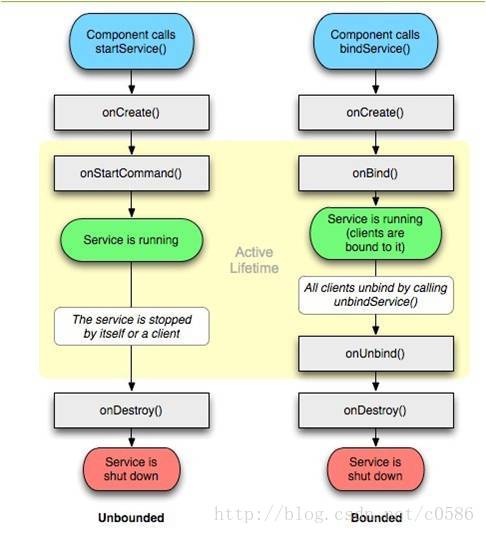
在 Bounded 方式下,onUnbind() 之後還可能調用 onRebind():當再次綁定一個此前已建立、尚未被銷毀(未執行 onDestroy())的服務物件時,就會調用 onRebind(),且這次不會再調用 onBind()。掌握 startService 與 bindService 的差異與生命週期,是靈活運用 Android 服務的基礎。
 淺談 Android 編碼規範與命名規範
在 Android 專案中,良好的編碼與命名規範能大幅提升維護效率。以下整理實務上常見的開發建議,適合團隊協作時參考。 一、編碼規範 1. 善用 string.x
 ShareSDK 分享到第三方平台完整集成指南
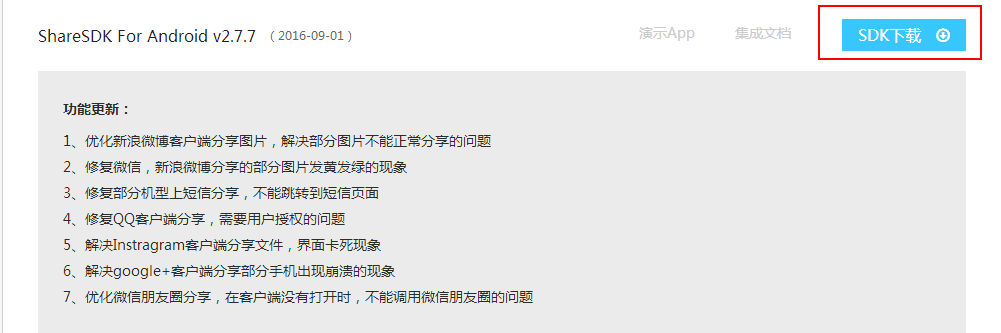
本文記錄 ShareSDK 從下載、申請 AppKey、快速集成到自訂 UI 的完整流程,並附上各平台分享參數說明,方便查閱。 第一步:下載 SDK 下載網址:https
 只用一個 TextView 實作高仿京東淘寶的活動倒計時
今天要分享的是:僅僅使用一個 TextView,就能做出高仿京東、淘寶、唯品會等電商 App 的活動倒計時樣式。 為什麼要只用一個 TextView 最近公司在做效
 Android 捕獲並攔截 TextView 超連結點擊的方法
本文分享如何捕獲 TextView 中的超連結點擊事件,希望能對大家有所幫助。所謂捕獲 TextView 超連結,指的是當一段文字裡含有網址時,TextView 會把它以