

編輯:關於 Android 開發
Android 4.0 之後不能在主線程(UI 線程)執行網路操作,因此所有請求都必須放到子線程中,再把結果透過 Handler 回傳給 UI 更新介面。以下示範兩個可重複使用的線程類別:一個走 GET,一個走 POST。
建構時傳入網址與 Handler,也可額外帶上 Authorization token。請求成功後把回應內容字串塞進 Message 的 obj,失敗則回傳錯誤標記。
import java.io.IOException;

import org.apache.http.HttpResponse;
import org.apache.http.HttpStatus;
import org.apache.http.client.ClientProtocolException;
import org.apache.http.client.HttpClient;
import org.apache.http.client.methods.HttpGet;
import org.apache.http.impl.client.DefaultHttpClient;
import org.apache.http.util.EntityUtils;

import android.os.Handler;
import android.os.Message;
import android.util.Log;

/**
 * 開啟線程以 Get 方式訪問網絡
 */
public class GetThread extends Thread {
    public static final int SUCCESS = 10, FAIL = -11;
    private String url;
    private Handler handler;
    private String token = "";

    public GetThread(String url, Handler handler) {
        this.url = url;
        this.handler = handler;
    }

    public GetThread(String url, Handler handler, String token) {
        this.url = url;
        this.handler = handler;
        this.token = token;
    }

    @Override
    public void run() {
        super.run();
        HttpClient httpClient = new DefaultHttpClient();
        HttpGet httpGet = new HttpGet(url);
        if (!token.equals("")) {
            httpGet.setHeader("Authorization", token);
            Log.v("asdf", token);
        }

        try {
            HttpResponse httpResponse = httpClient.execute(httpGet);
            Message msg = Message.obtain();
            Log.v("asdf", httpResponse.getStatusLine().getStatusCode()
                    + "返回碼 " + url);
            if (httpResponse.getStatusLine().getStatusCode() == HttpStatus.SC_OK) {
                String jsonString = EntityUtils.toString(httpResponse.getEntity());
                msg.what = SUCCESS;
                msg.obj = jsonString;
                handler.sendMessage(msg);
            } else {
                msg.what = FAIL;
                handler.sendMessage(msg);
            }
        } catch (ClientProtocolException e) {
            e.printStackTrace();
        } catch (IOException e) {
            e.printStackTrace();
        }
    }
}
POST 的差別在於要帶入請求主體(HttpEntity)。這裡透過 isJson 旗標決定走 JSON 格式或一般表單格式,並可選擇是否附帶 userid 與 token。
import java.io.IOException;

import org.apache.http.HttpEntity;
import org.apache.http.HttpResponse;
import org.apache.http.HttpStatus;
import org.apache.http.ParseException;
import org.apache.http.util.EntityUtils;

import android.os.Handler;
import android.os.Message;
import android.util.Log;

public class PostThread extends Thread {
    public static final int SUCCESS = 0, FAIL = -1;
    private Handler handler;
    private HttpEntity jsonEntity;
    private String url_path;
    private boolean isJosn;
    private String token = "";
    private String userid = "";

    public PostThread(Handler handler, HttpEntity jsonEntity, String url_path,
                      boolean isJson) {
        this.handler = handler;
        this.jsonEntity = jsonEntity;
        this.url_path = url_path;
        this.isJosn = isJson;
    }

    public PostThread(Handler handler, HttpEntity jsonEntity, String url_path,
                      boolean isJson, String userid, String token) {
        this.handler = handler;
        this.jsonEntity = jsonEntity;
        this.url_path = url_path;
        this.isJosn = isJson;
        this.userid = userid;
        this.token = token;
    }

    @Override
    public void run() {
        super.run();

        HttpResponse httpResponse;
        if (!token.equals("") && !userid.equals("")) {
            Log.v("asdf", token + " -- " + userid);
            if (isJosn) {
                httpResponse = HttpUtil.getHttpResponse(url_path, jsonEntity,
                        userid, token);
            } else {
                httpResponse = HttpUtil.getNormalHttpResponse(url_path,
                        jsonEntity, userid, token);
            }
        } else {
            if (isJosn) {
                httpResponse = HttpUtil.getHttpResponse(url_path, jsonEntity);
            } else {
                httpResponse = HttpUtil.getNormalHttpResponse(url_path,
                        jsonEntity);
            }
        }

        Log.v("asdf", "返回碼----》》"
                + httpResponse.getStatusLine().getStatusCode() + " " + url_path);
        if (httpResponse.getStatusLine().getStatusCode() == HttpStatus.SC_OK) {
            try {
                Message message = Message.obtain();
                message.what = SUCCESS;
                message.obj = EntityUtils.toString(httpResponse.getEntity());
                handler.sendMessage(message);
            } catch (ParseException e) {
                e.printStackTrace();
            } catch (IOException e) {
                e.printStackTrace();
            }
        } else {
            Message msg = Message.obtain();
            msg.what = FAIL;
            handler.sendMessage(msg);
        }
    }
}
別忘了在 AndroidManifest.xml 中加入 <uses-permission android:name="android.permission.INTERNET" />,否則會直接拋出權限異常。另外,Apache HttpClient 在較新的 Android 版本中已被標記為 deprecated,新專案建議改用 HttpURLConnection 或 OkHttp。
 在 Ubuntu 上從零搭建 Android 開發環境的完整配置流程
在 Linux 桌面上做 Android 開發,好處是資源佔用低、終端操作順手,缺點是環境配置環節比 Windows 瑣碎一些。本文把 JDK、Eclipse、ADT、A
 動手實作 RecyclerView:拖曳排序與側滑刪除的完整教學
 先看成品效果,這篇文章會帶你一步步打造可拖曳排序、可側滑刪除的清單: 我們參考開源範例 Android
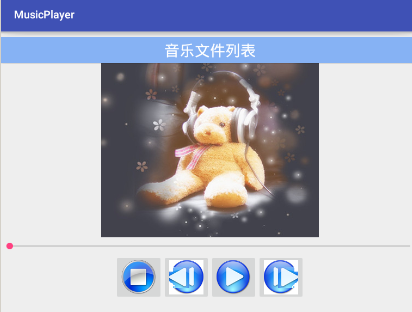 安卓學習筆記(十七):動手做一個簡易音樂播放器
安卓學習筆記(十七):簡易版本音樂播放器 這一課把前面學過的 Service、Binder 機制、SeekBar 與 MediaPlayer 串成一個完整的小專案:一個能
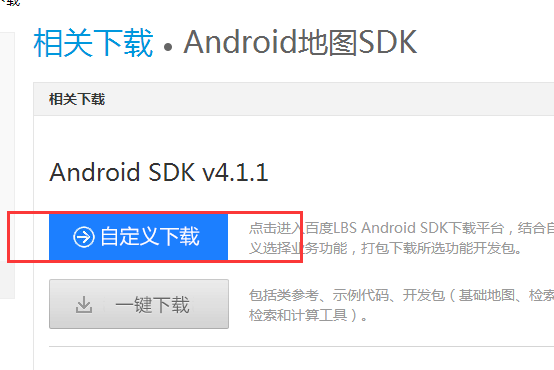 Android 接入百度地圖 SDK 完整教學:從下載到運行
手把手教你調用百度地圖 API 一、從百度地圖開放平台下載 SDK 官方下載頁:https://lbsyun.baidu.com/index.php?title=andr