編輯:關於Android編程
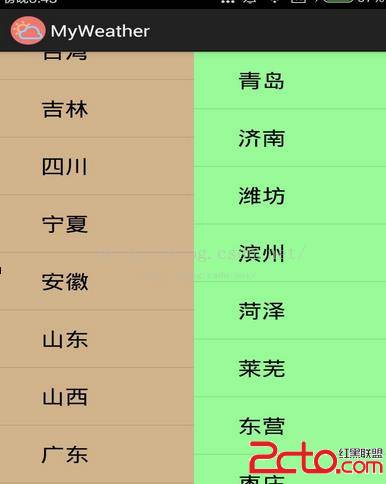
package com.dchan.myweather;

import java.io.UnsupportedEncodingException;
import java.net.URLEncoder;
import java.security.PublicKey;
import java.util.ArrayList;
import java.util.Calendar;
import java.util.Collection;
import java.util.HashMap;
import java.util.HashSet;
import java.util.Iterator;
import java.util.List;
import java.util.Map;
import java.util.Queue;

import com.dchan.SharedPreferences.MySharedPreferences;
import com.dchan.adpater.WeatherAdapter;
import com.dchan.http.DownLoad;
import com.dchan.jsonreader.JsonForReader;
import com.dchan.model.TodayWeatherModel;
import com.dchan.model.WeatherModel;
import com.dchan.mylayout.MyLayout;
import com.dchan.slidinglayout.SlidingLayout;
import com.edchan.myweather.R;

import android.os.AsyncTask;
import android.os.Bundle;
import android.os.Handler;
import android.os.Looper;
import android.os.Message;
import android.app.Activity;
import android.app.AlertDialog;
import android.app.AlertDialog.Builder;
import android.app.Dialog;
import android.app.ProgressDialog;
import android.content.BroadcastReceiver;
import android.content.Context;
import android.content.Intent;
import android.content.IntentFilter;
import android.content.SharedPreferences;
import android.support.v4.widget.SwipeRefreshLayout;
import android.support.v4.widget.SwipeRefreshLayout.OnRefreshListener;
import android.util.JsonReader;
import android.view.KeyEvent;
import android.view.LayoutInflater;
import android.view.MotionEvent;
import android.view.View;
import android.view.View.OnClickListener;
import android.view.View.OnTouchListener;
import android.widget.AdapterView;
import android.widget.AdapterView.OnItemClickListener;
import android.widget.AdapterView.OnItemLongClickListener;
import android.widget.ArrayAdapter;
import android.widget.ImageButton;
import android.widget.ImageView;
import android.widget.LinearLayout;
import android.widget.ListView;
import android.widget.SimpleAdapter;
import android.widget.TextView;
import android.widget.Toast;

public class MainActivity extends Activity {
	/*
	 * 滑動布局
	 */
	SlidingLayout slidingLayout;
	/*
	 * 主界面
	 */
	View weatherContent;
	/*
	 * 城市列表
	 */
	ListView cityList;
	/*
	 * 一個城市當天以及未來幾天的天氣
	 */
	ListView cityWeatherList;
	/*
	 * 左邊按鈕
	 */
	ImageButton button1;
	/*
	 * 右邊按鈕
	 *
	 */
	ImageButton button2;
	SwipeRefreshLayout swipeRefreshLayout;


	/*
	 * 當天的日期
	 */
	TextView todayText;
	/*
	 * 城市
	 */
	TextView city;
	/*
	 * 天氣圖片
	 */
	ImageView imageView;
	/*
	 * 天氣文字
	 */
	TextView weatherText;
	/*
	 * 平均溫度
	 */
	TextView evrTemp;
	/*
	 * 最高溫度
	 */
	TextView highTemp;
	/*
	 * 最低溫度
	 */
	TextView lowTemp;

	/*
	 *
	 * 點擊增加城市
	 */
	ImageButton addCityButton;

	TodayWeatherModel todaymodel;
	MyHandler myHandler;
	public static final int setWeatherList=1;//通知handler更新listview
	public static final int REFLASHCITY=2;//通知handler更新城市列表
	public static long time=0;//用於處理雙擊退出

	MyBroadcast broadcast=new MyBroadcast();

	String theCity;//當前顯示的城市
	ArrayAdapter cityAdapter;

	//MySharedPreferences myCities=new MySharedPreferences(this);
	ArrayList nameList;//所有的城市

	SharedPreferences sharedPreferences;
	private String theFirst="0";//是否第一次啟動

	LinearLayout todayLinearLayout;//今天天氣的布局,用於點擊彈出更多信息
	TextView cold;//感冒描述
	TextView windStrength;//風力
	TextView windDirection;//風向
	LayoutInflater inflater;
	View view;//moreInformation的layout
	AlertDialog dialog;//moreInformation的對話框

	ProgressDialog progressDialog;//用於加載時顯示

	@Override
	protected void onCreate(Bundle savedInstanceState) {
		super.onCreate(savedInstanceState);
		setContentView(R.layout.main);

		inflater=getLayoutInflater();
		view=inflater.inflate(R.layout.more_information, null);

		slidingLayout=(SlidingLayout)findViewById(R.id.sliding);
		weatherContent=(LinearLayout)findViewById(R.id.mycontent);
		button1=(ImageButton)findViewById(R.id.add_city_button);
		button2=(ImageButton)findViewById(R.id.add_more_button);
		cityList=(ListView)findViewById(R.id.city_list);
		cityWeatherList=(ListView)findViewById(R.id.city_weadther_list);
		slidingLayout.setScrollEvent(cityWeatherList);

		todayText=(TextView)findViewById(R.id.thedate);
		city=(TextView)findViewById(R.id.city);
		imageView=(ImageView)findViewById(R.id.todayweather);
		weatherText=(TextView)findViewById(R.id.todayweathertext);
		evrTemp=(TextView)findViewById(R.id.todayvertemp);
		highTemp=(TextView)findViewById(R.id.todayhightemp);
		lowTemp=(TextView)findViewById(R.id.todaylowtemp);

		addCityButton=(ImageButton)findViewById(R.id.add_city_button);

		swipeRefreshLayout=(SwipeRefreshLayout)findViewById(R.id.swipe_container);
		swipeRefreshLayout.setColorScheme(android.R.color.holo_blue_light, android.R.color.holo_red_dark, android.R.color.holo_purple, android.R.color.holo_green_light);

		todayLinearLayout=(LinearLayout)findViewById(R.id.todayweatherlayout);
		cold=(TextView)view.findViewById(R.id.cold);
		windStrength=(TextView)view.findViewById(R.id.wind_strength);
		windDirection=(TextView)view.findViewById(R.id.wind_direction);
		dialog=new AlertDialog.Builder(MainActivity.this).setView(view).setTitle("                更多信息").create();

		progressDialog=new ProgressDialog(this);

		myHandler=new MyHandler();

		sharedPreferences=getSharedPreferences("city", MODE_PRIVATE);
		/*SharedPreferences.Editor editor1=sharedPreferences.edit();
		editor1.clear();
		editor1.commit();*/
		theCity=sharedPreferences.getString("theCity", "深圳");
		theFirst=sharedPreferences.getString("theFirst", "0");
		if(theFirst.equals("0")){
			theFirst="1";
			SharedPreferences.Editor editor=sharedPreferences.edit();
			editor.putString("theFirst", theFirst);
			editor.commit();

			Intent intent=new Intent();
			intent.setClass(MainActivity.this, BeginActivity.class);
			startActivity(intent);
		}
		/*SharedPreferences.Editor editor=sharedPreferences.edit();
		editor.clear();
		editor.commit();*/


		nameList=getCityList();

		if(nameList!=null){
			System.out.println("nameList is not null");
			ArrayAdapter adapter=new ArrayAdapter(MainActivity.this, android.R.layout.simple_expandable_list_item_1, nameList);
			cityList.setAdapter(adapter);
		}

		todayLinearLayout.setOnClickListener(new OnClickListener() {

			@Override
			public void onClick(View v) {
				dialog.show();
			}
		});

		swipeRefreshLayout.setOnRefreshListener(new OnRefreshListener() {

			@Override
			public void onRefresh() {
				startReflashUI();
				new Thread(){
					public void run(){
						try {
							sleep(5000);
						} catch (InterruptedException e) {
							// TODO Auto-generated catch block
							e.printStackTrace();
						}
						swipeRefreshLayout.setRefreshing(false);
					}
				}.start();
			}
		});


		startReflashUI();

		addCityButton.setOnClickListener(new OnClickListener() {

			@Override
			public void onClick(View v) {
				System.out.println("!!!!!!!!!!!");
				Intent intent=new Intent(MainActivity.this, AddCityActivity.class);
				startActivity(intent);
			}
		});

		/*
		 * city列表,用於刪除城市
		 */
		cityList.setOnItemLongClickListener(new OnItemLongClickListener() {

			@Override
			public boolean onItemLongClick(AdapterView arg0, View arg1,
					int arg2, long arg3) {

				String key=nameList.get(arg2);
				nameList.remove(arg2);
				deleteCity(key);
				Message msg=new Message();
				msg.what=REFLASHCITY;
				myHandler.sendMessage(msg);
				return true;
			}
		});
		/*
		 * 點擊要查看city的天氣
		 */
		cityList.setOnItemClickListener(new OnItemClickListener() {

			@Override
			public void onItemClick(AdapterView arg0, View arg1, int arg2,
					long arg3) {
				theCity=nameList.get(arg2);
				SharedPreferences.Editor editor=sharedPreferences.edit();
				editor.putString("theCity", theCity);
				editor.commit();
				startReflashUI();
				slidingLayout.scrollToRightLayout();
			}
		});

		registerReceiver(broadcast, getIntentFilter());
	}
	/*
	 * handler處理UI事件
	 */
	class MyHandler extends Handler{

		@Override
		public void handleMessage(Message msg) {
			super.handleMessage(msg);
			System.out.println("inide");
			switch (msg.what) {
			case setWeatherList:
				System.out.println("setWeatherList");
				ArrayList weatherlist=(ArrayList) msg.obj;
				WeatherAdapter adapter=new WeatherAdapter(MainActivity.this, weatherlist);
				cityWeatherList.setAdapter(adapter);

				todayText.setText(weatherlist.get(0).getDay());
				city.setText(weatherlist.get(0).getCity());
				imageView.setBackgroundResource(weatherlist.get(0).findImageResouce(weatherlist.get(0).getWeatherImage()));
				weatherText.setText(weatherlist.get(0).getWeatherImage());
				evrTemp.setText(weatherlist.get(0).getVerTemp());
				highTemp.setText(weatherlist.get(0).getHighTemp());
				lowTemp.setText(weatherlist.get(0).getLowTemp());

				/*
				 * 對話框的內容
				 */
				windStrength.setText(weatherlist.get(0).getWindStrength());
				windDirection.setText(weatherlist.get(0).getWindDirection());
				cold.setText(weatherlist.get(0).getCold());

				//progressDialog.dismiss();
				break;
			case REFLASHCITY:
				System.out.println("REFLASHCITY");
				cityAdapter=new ArrayAdapter(MainActivity.this, android.R.layout.simple_expandable_list_item_1, nameList);
				cityList.setAdapter(cityAdapter);
				cityAdapter.notifyDataSetChanged();
				startReflashUI();
			break;
			default:
				break;
			}
		}
	}


	public IntentFilter getIntentFilter(){
		IntentFilter filter=new IntentFilter();
		filter.addAction("CITYSELECT");
		return filter;
	}
	class MyBroadcast extends BroadcastReceiver{

		@Override
		public void onReceive(Context context, Intent intent) {
			String action=intent.getAction();
			SharedPreferences.Editor editor=sharedPreferences.edit();
			if(action.equals("CITYSELECT")){
				String city=intent.getStringExtra("city");
				theCity=city;
				if(theCity!=null){
					System.out.println(theCity);
					editor.putString(city, city);
					editor.putString("theCity", theCity);
					editor.commit();
				}
				System.out.println("isSet");
				nameList.add(city);
				for(int i=0;i weatherlist=reader.getListWeather();
					todaymodel=reader.getTodayWeatherModel();
					Message msg=myHandler.obtainMessage();
					msg.what=setWeatherList;
					msg.obj=weatherlist;
					myHandler.sendMessage(msg);


				} catch (UnsupportedEncodingException e) {
					// TODO Auto-generated catch block
					e.printStackTrace();
				}

			}

		}.start();
	}

	@Override
	protected void onDestroy() {
		super.onDestroy();

		unregisterReceiver(broadcast);
	}

	/*
	 * 查找城市
	 */
	public ArrayList getCityList(){
		ArrayList cityList1=new ArrayList();
		Map map=(Map) sharedPreferences.getAll();
		Collection collection=map.values();
		Iterator iterator=collection.iterator();

		while(iterator.hasNext()){
			String city=iterator.next();
			System.out.println("城市----"+city);
			if(!(city.equals("0")||city.equals("1"))){
				cityList1.add(city);
			}
		}
		//用一個HashSet來將cityList1裡面的重復元素去除
		HashSet h=new HashSet(cityList1);
		cityList1.clear();
		cityList1.addAll(h);
		return cityList1;
	}

	/*
	 * 增加城市
	 */
	public boolean setCityList(String key,String value){
		SharedPreferences.Editor editor=sharedPreferences.edit();
		editor.putString(key, value);
		boolean isSet=editor.commit();
		return isSet;
	}
	/*
	 * 刪除城市
	 */
	public boolean deleteCity(String key){
		SharedPreferences.Editor editor=sharedPreferences.edit();
		editor.remove(key);
		boolean isDelete=editor.commit();
		return isDelete;
	}

	/*
	 * 雙擊退出
	 * @see android.app.Activity#onKeyDown(int, android.view.KeyEvent)
	 */
	@Override
	public boolean onKeyDown(int keyCode, KeyEvent event) {
		switch (keyCode) {
		case KeyEvent.KEYCODE_BACK:
			if(System.currentTimeMillis()-time>2000){
				Toast.makeText(this, "退出?", 1000).show();
				time=System.currentTimeMillis();
			}else{
				finish();
			}

			return false;

		default:
			break;
		}
		return super.onKeyDown(keyCode, event);
	}
}
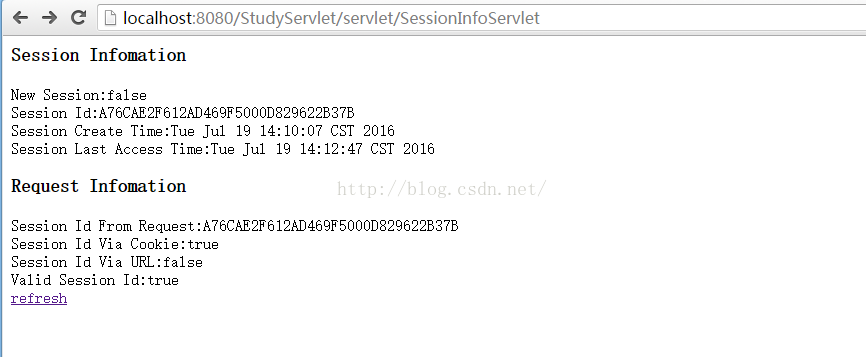 Servlet學習(六)Session
與Cookie相似,session也是用來記錄數據和狀態的。不同在與,cookie記錄數據在客戶端,session記錄數據在服務器端。通過每個浏覽器的特定編號。(重點)s
 Android 自定義RadioButton 實現文字上下左右方向的圖片大小設置
好久沒有更新博客,寫這篇技術時,感覺很多東西生疏了好多。於是心有感慨:我們做技術的,要是長時間不搞技術,那就是被技術搞!所以攻守之間,大家謹慎思量。冬天已過,放假出去玩耍
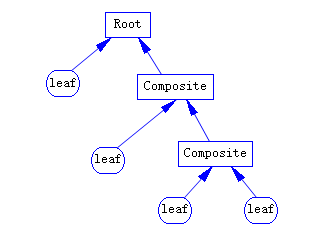 java/android 設計模式學習筆記(12)---組合模式
這篇我們來介紹一下組合模式(Composite Pattern),它也稱為部分整體模式(Part-Whole Pattern),結構型模式之一。組合模式比較簡單,它將一組
 Android Wear
原文地址:http://developer.android.com/design/wear/index.html 前言 設計Android Wear可穿戴設備應用程