

編輯:Android 技術基礎
TelephonyManager 類別提供了一整套與手機通訊相關的狀態與資訊 get 方法,涵蓋 SIM 卡的狀態與資訊、電信網路狀態,以及手機用戶的相關資訊。在應用程式中,我們可以透過這些 get 方法取得需要的資料。
TelephonyManager 的物件可透過 Context.getSystemService(Context.TELEPHONY_SERVICE) 取得。要留意的是,部分通訊資訊的讀取會受到權限限制,開發時務必為其加上對應的權限。
打開 res/layout/activity_main.xml,放一顆「獲得手機網絡信息」按鈕:
<?xml version="1.0" encoding="utf-8"?>
<LinearLayout
    xmlns:android="https://schemas.android.com/apk/res/android"
    android:layout_width="match_parent"
    android:layout_height="match_parent"
    android:orientation="vertical" >

    <Button
        android:id="@+id/getphoneinfo"
        android:layout_width="wrap_content"
        android:layout_height="wrap_content"
        android:text="獲得手機網絡信息" />

</LinearLayout>
打開 src/com.genwoxue.telephony/MainActivity.java:
package com.genwoxue.telephony;


import android.os.Bundle;
import android.view.View;
import android.view.View.OnClickListener;
import android.widget.Button;
import android.widget.EditText;
import android.widget.Toast;
import android.app.Activity;
import android.telephony.TelephonyManager;
import android.content.Context;

public class MainActivity extends Activity {

    private Button btnGet=null;

    @Override
    protected void onCreate(Bundle savedInstanceState) {
        super.onCreate(savedInstanceState);
        setContentView(R.layout.activity_main);

        btnGet=(Button)super.findViewById(R.id.getphoneinfo);
        btnGet.setOnClickListener(new OnClickListener(){
            public void onClick(View v)
            {
                StringBuilder info=new StringBuilder();
                //獲取TelephonyManager服務
                TelephonyManager telphony=(TelephonyManager)MainActivity.this.getSystemService(Context.TELEPHONY_SERVICE);
                //獲取移動服務商名稱
                info.append(telphony.getNetworkOperatorName()+"☆☆☆");
                //獲取設備號碼
                info.append(telphony.getDeviceId()+"☆☆☆");

                Toast.makeText(getApplicationContext(), info, Toast.LENGTH_LONG).show();
            }
        });
    }
}
打開 AndroidManifest.xml:
<?xml version="1.0" encoding="utf-8"?>
<manifest xmlns:android="https://schemas.android.com/apk/res/android"
    package="com.genwoxue.telephony"
    android:versionCode="1"
    android:versionName="1.0" >

    <uses-sdk
        android:minSdkVersion="11"
        android:targetSdkVersion="15" />

    <uses-permission android:name="android.permission.READ_PHONE_STATE"/>

    <application
        android:allowBackup="true"
        android:icon="@drawable/ic_launcher"
        android:label="@string/app_name"
        android:theme="@style/AppTheme" >
        <activity
            android:name="com.genwoxue.telephony.MainActivity"
            android:label="@string/app_name" >
            <intent-filter>
                <action android:name="android.intent.action.MAIN" />
                <category android:name="android.intent.category.LAUNCHER" />
            </intent-filter>
        </activity>
    </application>

</manifest>
讀取電話狀態必須加上這項權限:
<uses-permission android:name="android.permission.READ_PHONE_STATE"/>
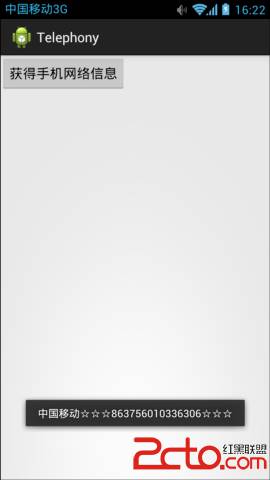
按下按鈕,程式會以 Toast 顯示電信服務商名稱與設備號碼等資訊,讓你一眼掌握手機的通訊環境。
 AsyncTask 一次講清楚:三個泛型、五個回呼與四條使用禁忌(從零開始學 Android)
只要 App 需要連網路、讀檔案或做任何耗時運算,就一定要離開主執行緒。原因很直接:UI 只能在主執行緒(UI thread)上更新,而主執行緒一旦被長時間佔用,畫面就會
 WebView 緩存機制全解析:開啟、模式選擇與清理
本節引言 如今不少門戶資訊類應用,比如虎嗅、ifanr、鈦媒體等的 App,本質上都是內嵌一個 WebView 來展示相關內容,這就自然牽扯到 WebView 的緩存問題
 Android HTTP 請求方式:HttpURLConnection 詳解
本節引言 前面兩節我們學習的都是一些概念性的東西,比如 HTTP 協議以及協議頭的相關知識,而本節就要開始堆碼了。本節學習的是 Android 為我們提供的 HTTP 請
 Android 網路編程入門與 HTTP 協議完全解析
本節導讀 終於來到 Android 網路編程這一關鍵章節。前面我們寫的都是單機程式,難免有些意猶未盡。從本節開始,我們正式邁入網路開發的世界。接下來要掌握的內容包括:An