

編輯:關於 Android 程式設計
ViewSwitcher 屬於 ViewAnimator 家族,專門用來在兩個子 View 之間輪流顯示,同一時間只會有一個出現在畫面上。它最適合做「一組圖片與一組資訊互換」這類簡單的切換場景,並能自帶進出動畫。
答案寫在原始碼裡:
/** * {@inheritDoc} * * @throws IllegalStateException if this switcher already contains two children */ @Override public void addView(View child, int index, ViewGroup.LayoutParams params) { if (getChildCount() >= 2) { throw new IllegalStateException("Can't add more than 2 views to a ViewSwitcher"); } super.addView(child, index, params); }
一旦子 View 超過兩個,就會拋出 java.lang.IllegalStateException 並印出 "Can't add more than 2 views to a ViewSwitcher"。想動態產生內容,正確做法是用 setFactory() 提供一個 ViewFactory,讓 ViewSwitcher 反覆呼叫同一份樣板來產生 View,而不是硬塞第三個進去。
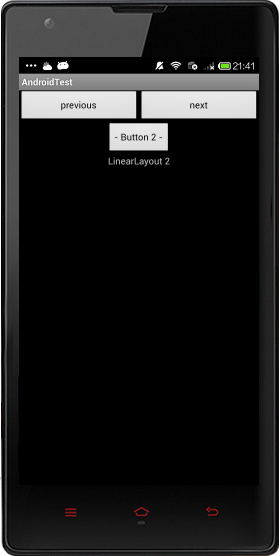
上方放了 previous / next 兩個按鈕,下方則是 ViewSwitcher,內含一個 ImageView 與一個由 Button、TextView 組成的 LinearLayout。
<?xml version="1.0" encoding="utf-8"?> <LinearLayout xmlns:android="https://schemas.android.com/apk/res/android" xmlns:tools="https://schemas.android.com/tools" android:layout_width="match_parent" android:layout_height="match_parent" android:orientation="vertical" tools:context=".MainActivity" > <LinearLayout android:layout_width="match_parent" android:layout_height="wrap_content" android:orientation="horizontal" > <Button android:id="@+id/prev" android:layout_width="0dp" android:layout_height="wrap_content" android:layout_weight="1" android:text="previous" /> <Button android:id="@+id/next" android:layout_width="0dp" android:layout_height="wrap_content" android:layout_weight="1" android:text="next" /> </LinearLayout> <ViewSwitcher android:id="@+id/viewswitcher" android:layout_width="match_parent" android:layout_height="wrap_content" > <ImageView android:layout_width="wrap_content" android:layout_height="wrap_content" android:src="@drawable/ic_launcher" /> <LinearLayout android:layout_width="match_parent" android:layout_height="wrap_content" android:gravity="center" android:orientation="vertical" > <Button android:layout_width="wrap_content" android:layout_height="wrap_content" android:text="- Button 2 -" /> <TextView android:layout_width="wrap_content" android:layout_height="wrap_content" android:text="LinearLayout 2" /> </LinearLayout> </ViewSwitcher> </LinearLayout>
package com.example.AndroidTest; import android.app.Activity; import android.os.Bundle; import android.view.View; import android.view.animation.Animation; import android.view.animation.AnimationUtils; import android.widget.Button; import android.widget.ViewSwitcher; public class MyActivity extends Activity { Button buttonPrev, buttonNext; ViewSwitcher viewSwitcher; Animation slide_in_left, slide_out_right; @Override protected void onCreate(Bundle savedInstanceState) { super.onCreate(savedInstanceState); setContentView(R.layout.activity_main); buttonPrev = (Button) findViewById(R.id.prev); buttonNext = (Button) findViewById(R.id.next); viewSwitcher = (ViewSwitcher) findViewById(R.id.viewswitcher); slide_in_left = AnimationUtils.loadAnimation(this, android.R.anim.slide_in_left); slide_out_right = AnimationUtils.loadAnimation(this, android.R.anim.slide_out_right); viewSwitcher.setInAnimation(slide_in_left); viewSwitcher.setOutAnimation(slide_out_right); buttonPrev.setOnClickListener(new View.OnClickListener() { @Override public void onClick(View arg0) { viewSwitcher.showPrevious(); } }); buttonNext.setOnClickListener(new View.OnClickListener() { @Override public void onClick(View arg0) { viewSwitcher.showNext(); } }); } }
執行效果圖:
如果兩個子 View 需要在執行期才決定內容,就改用 Factory 模式,分兩步走。
第一步,取得 ViewSwitcher 的實例:
switcher = (ViewSwitcher) findViewById(R.id.viewSwitcher);
第二步,實作 ViewFactory 介面:
switcher.setFactory(new ViewFactory() { @Override public View makeView() { return inflater.inflate(R.layout.slidelistview, null); } });
切換動畫可透過 setInAnimation() 與 setOutAnimation() 指定,系統內建的 android.R.anim 裡已有 slide_in_left、slide_out_right、fade_in、fade_out 等現成資源可直接套用,也可以自訂 XML 動畫。
切換方法只有兩個:showNext() 往下一個、showPrevious() 往上一個,兩者都會自動循環。若需要取得目前顯示的是第幾個,用 getCurrentView() 搭配 getDisplayedChild() 即可。
最後提醒,ViewSwitcher 的定位是「二選一」,若你的需求是三個以上頁面輪播,該考慮的是 ViewPager 或 RecyclerView 加 LayoutManager,硬用 ViewSwitcher 只會撞到那個 IllegalStateException。
 自定義 View 實作側滑刪除:ViewDragHelper 的完整拆解
即時通訊與郵件 App 裡那種「往左拉出刪除按鈕」的互動,看起來簡單,自己動手做卻常卡在手勢判定與位置同步上。本文用 ViewDragHelper 一步步實作一個可重複使
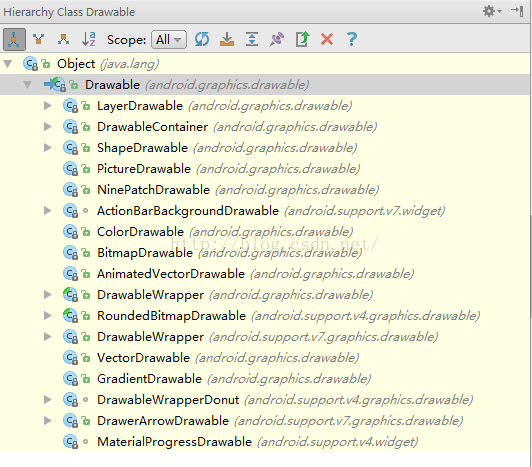 Android Drawable 詳解:從 BitmapDrawable 到 ClipDrawable
Drawable 是 Android 中非常常見的資源類型。它可以是一張圖片,也可以是通過 XML 定義的形狀、漸變、層疊或裁剪效果。掌握 Drawable,可以讓界面背
 Android 開源工具庫大盤點(六):依賴注入、圖片、網路、ORM 到插件化
這一篇整理的是各類好用的開發庫,涵蓋依賴注入框架、圖片緩存、網路相關、資料庫 ORM 建模、Android 公共庫、高版本 API 向低版本相容、多媒體處理等等。 一、
 Android 短視頻錄制實作:仿微信小視頻(下)
簡述 上一篇我們已經完成了視頻錄制控件的相關封裝,這一篇則聚焦在控件的具体使用。其實只要讀一遍控件源碼就會發現用法相當直觀,各位可以依自身需求調整參數,以下代碼僅供參考。