

編輯:關於 Android 程式設計
AndroidTestCase 是寫 Android 單元測試最直接的入口,整體流程就是 setUp → 測試方法 → tearDown。下面用一個最小範例說明。
package com.test.casei;
import android.test.AndroidTestCase;
import android.util.Log;
public class TestCase extends AndroidTestCase {
private static final String TAG = "TestCase";
@Override
protected void setUp() throws Exception {
super.setUp();
Log.i(TAG, "[setUp]");
}
public void doWorkTest(){
Log.i(TAG, "[doWorkTest]");
}
@Override
protected void tearDown() throws Exception {
super.tearDown();
Log.i(TAG, "[tearDown]");
}
}
<?xml version="1.0" encoding="utf-8"?>
<manifest xmlns:android="https://schemas.android.com/apk/res/android"
package="com.test.casei"
android:versionCode="1"
android:versionName="1.0" >
<uses-sdk android:minSdkVersion="10" />
<application
android:icon="@drawable/ic_launcher"
android:label="@string/app_name" >
<uses-library android:name="android.test.runner" /><!-- 為測試添加 android.test.runner-->
</application>
<!-- 為測試添加 android.test.InstrumentationTestRunner -->
<instrumentation
android:name="android.test.InstrumentationTestRunner"
android:targetPackage="com.test.casei"
android:label="test"
/>
</manifest>
重點有兩個:application 節點中要補上 android.test.runner 這個 uses-library,manifest 下則要宣告 InstrumentationTestRunner 並透過 android:targetPackage 指向被測程式。
setup() ------> doWorkTest() ----> tearDown()
也就是說,每個測試方法執行前都會先跑 setUp,跑完再走 tearDown,彼此之間不會互相污染狀態。
 Android FoldingLayout 折疊布局實戰:從 Matrix 原理到側滑菜單整合
FoldingLayout 那種「卡片折起來」的效果看起來很酷,但原理其實不複雜——核心就是 Matrix.setPolyToPoly()。本文從最基礎的座標變換出發,一
 Android 自定義控制項實作(下):帶清除鍵的 ClearEditText 與表情輸入框
上一篇《Android UI 編程之自定義控制項初步(上)——ImageButton》已經把自定義控制項的基本流程走過一遍。這篇接著挑戰 EditText,做兩個實用的小
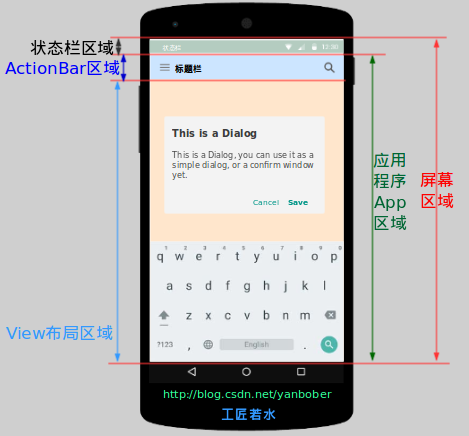 深入淺出 Android 座標系統:自定義 View 的地基知識
網路上談自定義控件的文章很多,但多半停在「怎麼畫出來」,很少系統性地談「怎麼算對位置」。而重寫 View 的那些 onXXX() 方法,本質上處理的幾乎都是座標運算。所以
 Android Studio 的 10 個高價值技巧:你可能一直不知道的效率捷徑
Android Studio 是每個 Android 開發每天都要打開的工具,但即使你已經用了好幾年,也很可能錯過了不少能省下大量時間的技巧。下面這十條,我不做逐句翻譯,