

編輯:關於 Android 開發
android.view.VelocityTracker 主要用來追蹤觸控事件的速率,最典型的場合就是 fling(快速甩動)與其他手勢判斷。
1. 取得實例。用 VelocityTracker.obtain(),不要自己 new。
2. 餵事件。在 onTouchEvent() 中呼叫 addMovement(MotionEvent),把每個事件都交給它。
3. 算速度。需要數值時先呼叫 computeCurrentVelocity(int units) 初始化單位,再用 getXVelocity()/getYVelocity() 取值。
int units 代表速度的時間基準單位:
units = 1:表示「每一毫秒移動了幾個像素」。units = 1000:表示「每一秒(1000 毫秒)移動了幾個像素」,也就是 px/s。實務上幾乎都用 1000,因為 px/s 才是我們對「快」的直覺刻度,門檻值也比較好憑感覺設定。
另一個參數 float maxVelocity 是速度上限:超過這個值的結果會被截為該值,用來過濾掉偶發的異常巨大數值。
addMovement(MotionEvent event):把使用者的移動事件加入追蹤器。computeCurrentVelocity(int units):依已收集的點位計算目前速度。computeCurrentVelocity(int units, float maxVelocity):同上,並限制上限。getXVelocity()/getYVelocity():取得最後一次計算的 X/Y 速度。getXVelocity(int id)/getYVelocity(int id):取得指定 pointer 的速度,多指操作時才需要。obtain():從資源池取得一個實例。recycle():歸還給資源池以便重複使用。clear()/reset():重設回初始狀態。
private VelocityTracker mVelocityTracker;      // 宣告變數

// 在 onTouchEvent(MotionEvent ev) 中
if (mVelocityTracker == null) {
    mVelocityTracker = VelocityTracker.obtain();     // 取得 VelocityTracker 實例
}
mVelocityTracker.addMovement(ev);                    // 將事件加入追蹤器

// 判斷當 ev 事件為 MotionEvent.ACTION_UP 時計算速率
final VelocityTracker velocityTracker = mVelocityTracker;
// 1000 代表以「每秒像素數」為單位
velocityTracker.computeCurrentVelocity(1, (float) 0.01);
// 當 maxVelocity 設為 0.01 時,實際速度大於 0.01 一律顯示 0.01,小於 0.01 則顯示原值
Log.i("test", "velocityTraker" + velocityTracker.getXVelocity());

velocityTracker.computeCurrentVelocity(1000);        // 不設上限,單位為 px/s
Log.i("test", "velocityTraker" + velocityTracker.getXVelocity());
記得 recycle。VelocityTracker 來自資源池,用完不歸還會讓系統一直配置新物件。標準做法是在 ACTION_UP/ACTION_CANCEL 的尾聲呼叫 recycle() 並把變數設回 null,下次進場再 obtain()。
不要在 ACTION_DOWN 就取值。那時樣本只有一個,算出來的速度沒有意義。速度判斷應該發生在抬手(ACTION_UP)或取消(ACTION_CANCEL)時。
另外提醒一個現代版本的差異:API 8 以後,computeCurrentVelocity 內部改採更精準的估算方式,因此同樣的手勢在不同 Android 版本上可能算出略微不同的速度。若你的翻頁門檻對版本差異很敏感,最好在目標版本的最低與最高端各實測一次再定案。
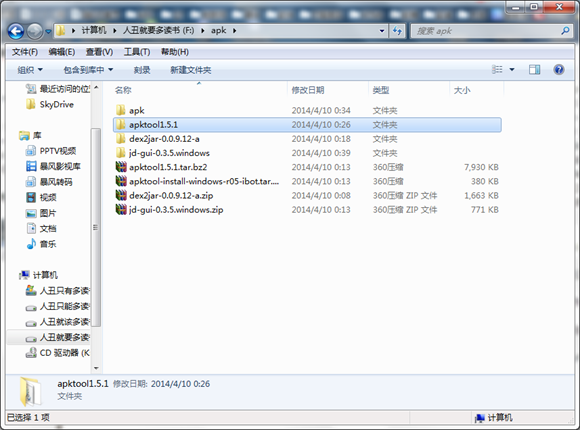 Android APK 逆向分析入門:反編譯與源碼檢視全流程
 無論是為了排查自己應用的問題、做安全研究,還是單純想理解一款 App 背後的實作邏輯,掌握 APK 逆向分析
 Android 開發環境建置與第一個 HelloWorld 程式完整教學
 本文將帶你從零開始,在 Eclipse 中搭建 Android 開發環境,並完成一個可打包為 A
 按鈕單擊事件實現:自定義監聽器與登錄窗體入門
處理按鈕點擊是每個 Android 應用的基本功。本文以一個登錄界面為例,演示如何用自定義監聽類統一管理界面上的交互事件。 開發步驟 整體思路可以拆成四步: 1、聲明交
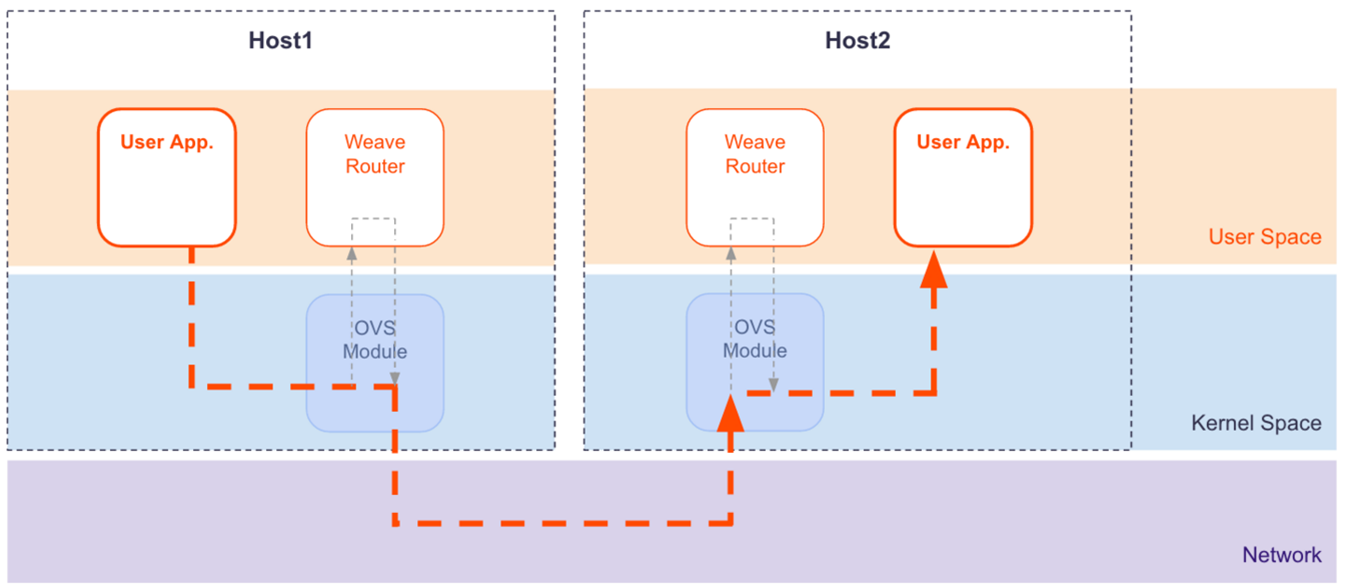 Docker 跨主機方案 Weave 的踩坑記錄:fastdp 與 virtio_net 相容性問題
問題背景 Weave 在 1.2 之後加入 fastdp 模式,預設使用核心的 Open vSwitch 與 VXLAN 進行封裝。若在特定核心版本的 CentOS 7